
Restreaming
Send a live stream to other platforms at the same time: YouTube, Facebook, Twitch, another Unda server, anything that takes RTMP, RTMPS, SRT, UDP or RTP.
From the dashboard
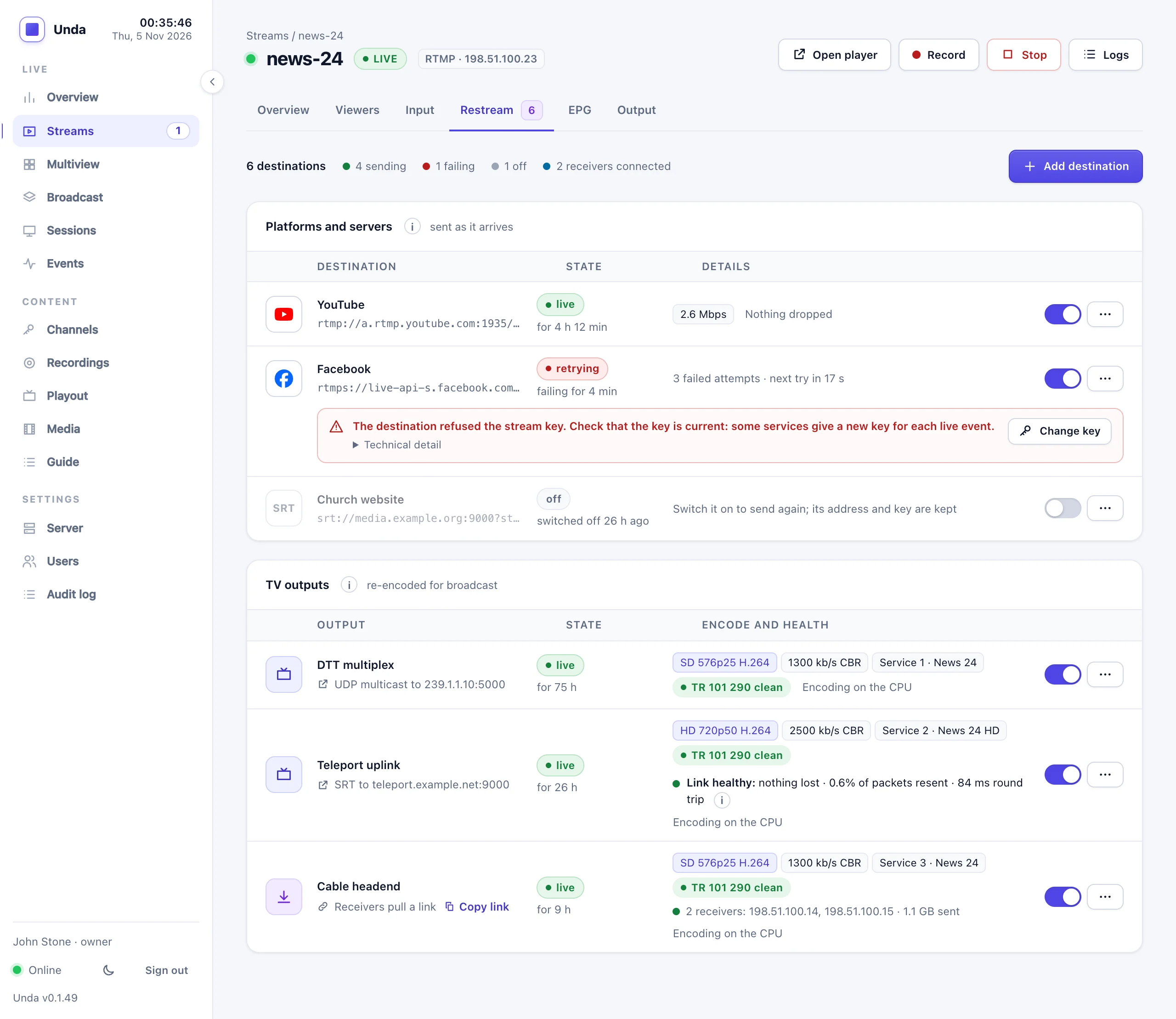
Open the stream, Restream tab. Destinations are in two lists: Platforms and servers get the stream as it arrives, and TV outputs are re-encoded for broadcast. A line above them counts what is sending, failing and switched off, and how many receivers are connected.
Two buttons add one:
Platform or server opens a box at the top of the Platforms list: a name, then the server link and the stream key, as your service shows them. Add and start sending adds it.
Service Server link Stream key YouTube rtmp://a.rtmp.youtube.com/live2from YouTube Studio Facebook rtmps://live-api-s.facebook.com:443/rtmpfrom Live Producer Twitch rtmp://live.twitch.tv/appfrom the Creator Dashboard Another server over SRT srt://host:port?passphrase=...its stream ID, if it uses one A local network over UDP (operators) udp://239.1.1.10:5000none MPEG-TS over RTP (operators) rtp://192.168.1.50:5004none Use exactly what your service gives you: Unda fills nothing in, so any service works. For RTMP the key goes after the link, for SRT it becomes the
streamid; a link that already holds everything takes no key. Well-known services (YouTube, Facebook, Instagram, Twitch, TikTok, X, Vimeo, Dailymotion, Telegram and Rumble) are recognised from their server and show their logo; other servers show their protocol.New TV output (operators) opens a page of its own: see Broadcast TV below.
Each row has a switch (off stops sending but keeps the destination and its key). A platform's ⋯ menu has Edit and Remove: Edit opens the same box under its row, filled in, and Remove asks under the row before it removes anything. For an RTMP destination the server link is shown and the key isn't: leave the key empty to keep it, or type the new one (a destination whose key was refused shows Change key under its row, with the reason). For other addresses, leave the link empty to keep the saved one. Saving a destination that is sending reconnects it (the button says Save and reconnect), so its receiving side loses the stream for a few seconds; a switched-off one stays off. A TV output's row opens its page: click the row or Open. Destinations listed in unda.yaml are changed in the file.
How it behaves
- It starts straight away and keeps going for as long as the stream is live. If the stream stops, the destination waits and resumes by itself when the stream comes back.
- A destination shows live only once the platform has accepted the stream (for RTMP, its
NetStream.Publish.Startanswer), not merely when the connection opens: a wrong or expired key shows as a failure, never as live. - A destination that fails is retried after 5 s, 10 s, 30 s, 1 min, 2 min, then every 5 minutes. One failing destination never affects the others or your viewers.
- A destination that keeps failing for 30 minutes is switched off (an ended live event, a revoked key), shown as "switched off" with the reason, and stays off (after a restart too) until you switch it back on.
- Each destination's state and why it fails are shown on the Restream tab in plain words ("The destination refused the stream key…"), with the technical error behind "Technical detail". A destination failing for more than two minutes raises one alert per stream, however many destinations fail and however often they retry; the event log shows one line per failure run.
- An SRT receiver usually takes one caller at a time. If an SRT destination keeps saying the receiver didn't respond while something else calls the same address (an analysis of it under Broadcast → Analyse, another server, an earlier connection), stop that, then switch the destination off and on to retry at once. The channel's Logs button downloads every line about that address (Logs).
- Pause instead of delete. The switch next to each destination stops sending to it without deleting it, so the same destination (and its key) can be switched back on later, for the next event, without typing the key again. Switching it on starts sending at once if the stream is live. A paused destination stays paused after a restart and raises no "not connected" notice.
- MPEG-TS destinations are checked as they are sent. Every packet sent to a UDP, RTP, RIST or SRT destination or a TV output is checked against TR 101 290 (TV outputs on all three priorities, their network and time tables included). While it delivers, the destination's row shows TR 101 290 clean or the errors of the last minute; click it for the full report. An error raises a warning.
- Your platform keys stay secret: after you add a destination, the dashboard, the API and the logs only ever show it as
rtmp://a.rtmp.youtube.com/live2/****. - Destinations are kept across restarts. Destinations added in the dashboard or through the API are saved in the server database (readable by the server account only, like channel keys) and come back by themselves after a restart or an upgrade, pushing again as soon as the stream is live.
- Destinations can also be listed in the configuration file under
restream.targets(the URL can come from an environment variable or a file, to keep the key out of the configuration). Those are marked "from unda.yaml" on the Restream tab: to change them, edit the file.
Streamers can restream their own channels; operators and above any stream.
UDP, RTP, RIST and SRT destinations and broadcast outputs are TV outputs: they need the udp feature in your license, as well as restreaming (SRT is what TV stations take in). Restreaming to social media over RTMP and RTMPS needs only restreaming. SRT input and playback are separate (the srt feature). A streamer's destinations must be RTMP, RTMPS or SRT at a public internet address: a private, local or loopback address, or a name that points to one, is refused, and so are UDP and RTP. Operators and above can use any destination, including ones on your own network. RTP carries MPEG-TS in RFC 2250 packets, uses PCR for its 90 kHz timestamp, and has no encryption or authentication, so use it only on a trusted network.
Error correction for RTP (SMPTE 2022-1)
Broadcast equipment fed over IP (modulators, IRDs, teleport gateways) often expects SMPTE 2022-1 FEC with RTP: extra packets from which the receiver rebuilds lost ones, without asking for a resend. Add it to an rtp:// address:
rtp://10.0.0.20:5000?fec=1d                     column FEC (on port 5002)
rtp://10.0.0.20:5000?fec=2d                     column and row FEC (ports 5002 and 5004)
rtp://239.1.1.20:5000?fec=2d&fec_l=5&fec_d=20   your receiver's matrix
The media packets are arranged in a matrix of fec_l columns by fec_d rows (default 10 × 10). Each column's FEC packet rebuilds one lost packet in that column, so column FEC repairs a burst of up to fec_l lost packets in a row; 2d adds a FEC packet per row and repairs more scattered loss. Column FEC adds 1/fec_d to the bitrate (10 % at the default), row FEC another 1/fec_l. Limits: fec_l 1 to 20 (4 to 20 with 2d), fec_d 4 to 20, and fec_l × fec_d at most 100. Use the values from your receiver's documentation or the operator's spec sheet; the FEC ports (+2 and +4) must be open on the way. A receiver without FEC ignores them and plays the stream as usual. Over the internet, prefer SRT or RIST, which resend what was lost (RIST can also be encrypted: Encrypted RIST).
Two paths (SMPTE 2022-7)
To send over two networks at once, so the receiver can take each packet from whichever path brought it, add a second destination with path2 (and iface2 for its multicast interface):
rtp://239.1.1.20:5000?path2=239.2.1.20:5000&iface2=eth2
rist://gateway-a.example.net:5000?path2=gateway-b.example.net:5000
Every packet goes both ways, byte for byte (with RTP, its FEC too), so a receiver that merges two paths (SMPTE 2022-7, or a RIST receiver with two inputs) loses nothing while either path works. One path failing doesn't stop the output: the destination's row shows 2 paths and names a path whose sends fail; for RIST, a path whose receiver stops reporting. SRT outputs don't take a second path.
Broadcast TV (terrestrial and satellite)
For a DVB multiplexer, IP modulator or satellite uplink (operators only), choose New TV output. Its page has four parts: How it reaches the station (Unda sends it to an address, or The station fetches it when the station's receiver comes to you, by SRT or an HTTP link), Picture and sound, Channel details (what receivers list) and Extras (network and time tables, ad cues). Beside them, What the station gets shows the format and how the total bitrate splits between video, sound and tables, and follows every change. Add TV output at the bottom adds it.
Each TV output keeps that page. It opens with how the output is doing: its receivers (for one the station fetches), the transport stream's TR 101 290 check and the encoder, and the reason when it can't send. Its settings follow, one line per part; Change opens a part. A bar at the bottom names what you changed, with Discard and Save; saving restarts the encoder, so the station loses the picture for a few seconds. The switch at the top stops and starts it, and Remove is at the bottom of the page.
The stream is re-encoded to what TV equipment expects:
Picture: 16:9 in one of seven formats. A 4:3 or portrait source gets black bars at the sides; nothing is cropped.
Format Picture Use 576p25(default)SD 720×576, 25 frames/s SD services, older receivers 576i25SD 720×576 interlaced, top field first SD services whose equipment expects interlaced SD, as SD broadcast encoders commonly send 720p25HD 1280×720, 25 frames/s providers and IPTV services that take 720p at 25, as streaming encoders send it 720p50HD 1280×720, 50 frames/s HD services that use 720p 1080i25HD 1920×1080 interlaced, top field first the usual HD format in 50 Hz countries 1080p25HD 1920×1080, 25 frames/s IPTV and HD services that use 1080p, for material made at 25 frames/s 1080p50HD 1920×1080, 50 frames/s IPTV, contribution links and newer DVB-T2 and satellite HD services; sport and fast movement The interlaced formats are woven from 50 pictures a second: a 50 frames/s source moves in 50 fields a second, and a 25 frames/s source goes out with both fields of a frame from the same picture, so it looks just as it did.
Video: H.264 (DVB-T2 / DVB-S2; High profile for HD), HEVC (H.265; for 576p25, 720p50, 1080p25 and 1080p50, since HEVC services are progressive) or MPEG-2 (older DVB-T / DVB-S receivers; SD only). SD H.264 is sized by the whole transport stream: 1300 kb/s by default, the video filling what the audio and the stream's overhead leave (1040 kb/s with AAC at 128). Type another total and the video is fitted to it, or set the video rate yourself. H.264 720p25, 720p50 and 1080p25 are sized the same way: 2500, 4000 and 5000 kb/s by default (2050, 3410 and 4320 kb/s of video). Other defaults: H.264 8 Mb/s of video for 1080i25 and 1080p50; HEVC 1.2 Mb/s SD, 4 Mb/s HD; MPEG-2 4 Mb/s. 720p50 in H.264 also fits an SD-sized slot: 690 kb/s of video in a 1000 total, 960 in 1300, 1140 in 1500 (the other HD formats need at least 1500 of video). At these rates fast movement shows blocks sooner than in SD. Better quality (
better_quality: true) encodes with x264's slower "medium" preset instead of "veryfast" (HEVC: "veryfast" instead of "superfast"): measured on 720p25 at 840 kb/s of video, 5 to 7 VMAF points better, a visible difference, for about a quarter to a third of a CPU core more per output. The encoder uses B-frames, which every DVB receiver decodes and which give a better picture for the bitrate. If the equipment you send to is not a TV receiver but an IP gateway, transcoder or re-streamer, and the picture breaks up there, switch on No B-frames (no_b_frames: true): every picture then goes out in display order. Measured on SD at 750 kb/s of video, it costs at most about 1.5 VMAF points on fast movement and nothing on calm pictures.Audio: AAC (the default; 128 kb/s), MPEG-1 Layer II (MP2; the default with MPEG-2 video) or AC-3 (Dolby Digital, signalled the DVB way), 48 kHz stereo. AAC goes out as ADTS, which most receivers play; for receivers that follow DVB's letter, choose LATM packing (
aac_packing: latm, stream type 0x11). Sound language (language: eng, any three-letter ISO 639 code) labels the track: receivers show it in their audio menu, and pick by it when a channel has several. None by default. Sound is sent in packets of about 170 ms; One sound frame per packet (sound_frame_per_pes: true) sends each 21 ms frame on its own, as most streaming encoders do, for receiving software built around them. It needs 50 kb/s more room, so the video is fitted that much smaller (SD in a 1000 kb/s total: 700 kb/s of video).Bitrate: Constant (the default) is what DVB multiplexers, modulators and IRDs need. Variable (
variable_rate: true) sends the output streaming-style instead: each packet as soon as it is made, averaging under the total you set (a busy second can go a few percent over), without padding, the way streaming encoders send. With no padding to make room for, more of the total goes to the video: 840 kb/s of video in an 1100 kb/s total for 720p25, against 780 at a constant rate. Choose it when the receiving end is software built around such encoders (an IP-to-satellite provider, a re-streamer) and a constant-rate output breaks up there while a streaming encoder's plays. A variable-rate output carries no network and time tables and no ad cues (they travel in the constant rate's padding), and a bundle's channels are always constant-rate.Transport stream: a constant bitrate (the total you set, padded with null packets; or variable, above), with your channel name and provider in the service information (SDT), the service type receivers expect (SD or HD H.264, HEVC), and the service ID and PIDs your multiplexer expects.
Network and time tables: the NIT (network name and the channel) and the TDT/TOT (UTC and, with a time zone and country, the local time), as a bundle sends them. They are on by default and travel in the padding, so the bitrate doesn't change. Set them under Network and time tables in the form (
network_name,time_zone,country, ornetwork_tables: falsein the configuration file'sbroadcast:block).
In the configuration file:
restream:
  targets:
    - stream: news
      name: uplink
      url: udp://10.0.0.20:5000
      broadcast:
        format: 1080i25
        video_codec: h264
        video_kbps: 10000
        audio_codec: ac3
        audio_kbps: 192
        service_name: "News HD"
DVB-T2 and DVB-S2 networks that take H.264 only
Many national digital TV networks carry H.264 only, and their set-top boxes must decode HE-AAC; MP2 is optional for them. For a station on such a network:
- Video: H.264. MPEG-2 and HEVC won't play on its receivers.
- Audio: AAC (the default). Try LATM packing if a station's receivers show the channel without sound.
- Bitrate: what the station reserves for you. Many stations take SD channels at 1300 kb/s, which is the SD default.
- The station's headend adds what the network needs on top: its network table (NIT), the time (TDT), channel numbers and conditional access.
Send it with udp:// (unicast or multicast), rtp:// (with SMPTE 2022-1 FEC if the equipment expects it) or srt:// (over the internet, encrypted; srt://:port when the station's receiver connects to you, see below). Ask the multiplexer operator for the bitrate reserved for your service, and enter it as the constant total bitrate. Each broadcast destination runs its own encoder: plan for about a third of a CPU core for SD H.264, about one core for HD H.264 and about two for HEVC. 1080p50 takes about one and a half times as much (measured: 1.6 times 1080i25 in H.264, and 1.6 times 720p50 in HEVC); 1080p25 about the same as 1080i25.
Letting the receiver connect (SRT listener)
Some teleports and stations pull the channel: their receiver is an SRT caller and connects to you. On a new TV output's page choose The station fetches it, then Calls in over SRT, with the port, a passphrase and who may connect. Through the API or unda.yaml it is an address without a host, and Unda waits on that port:
srt://:9000?passphrase=a-long-passphrase- Give the receiving side this server's address, the port and the passphrase. Open the UDP port in the server's firewall.
- A listener needs a passphrase (10 to 79 characters) or the receivers' addresses:
allow=203.0.113.7,198.51.100.0/24takes only those. Use both when you can. Without either, anyone who found the port could take the channel, so Unda refuses the address. streamid=…takes only receivers that ask for that stream ID;latency=(milliseconds) is as for sending.- Up to 8 receivers at once (a main and a backup receiver, for example), each sent the whole channel. A receiver that can't keep up is let go; its gear connects again.
- The encoder keeps running while nobody is connected, so a receiver gets the channel the moment it connects. The row says who is connected, or that it is waiting, and shows a refused receiver with the reason (wrong passphrase, an address not allowed).
- Pick a port nothing else on the server uses: not the server's own SRT port, an input's or another output's.
The receiver stays connected when the source stops and starts again: it gets the channel again as soon as there is something to send. Only TV outputs and bundles listen. A stream sent on as it is needs no listener: the receiver pulls it from the server's own SRT port with streamid=read:<name> (SRT).
Tested with TSDuck 3.45 (libsrt 1.5.7) as the receiver: the SD channel arrived at exactly 1300 kb/s with its tables and no continuity errors.
Letting the receiver pull a link (HTTP)
Cable headends, IRDs and many gateways can fetch a channel over HTTP. Choose The station fetches it, then Pulls an HTTP link: when it is added, its page shows the link to give the station, on your server's own address:
https://tv.example.com/tv/3pX0b2Vq7mQkA1sLz9TfRw.ts- The link is the secret: anyone who has it can pull the channel, unless you list the addresses allowed (Who may pull it). Use the list when you know where the station's receiver connects from.
- It works over HTTPS. Turn on Plain HTTP too for receivers that can't use HTTPS; the channel then also answers on the server's plain HTTP port, and crosses the network unencrypted. On a server without HTTPS the link is plain HTTP.
- On the output's page, Show or Copy gives it again (the list's row has Copy link too); every look is in the audit log. Make a new link asks first, then ends the old one at once: receivers using it are cut off until the station has the new one, and the encoder carries on.
- Up to 8 receivers at once, each sent the whole channel. A receiver that falls 10 seconds behind is let go; its gear connects again. The output's page lists who is pulling and how much each has received, and a receiver that was refused (an address not on the list, plain HTTP when the link is HTTPS only).
- The encoder runs whether or not anyone is pulling, so a receiver gets the channel at once. Receivers stay connected when you edit the output or its source restarts; switching the output off or removing it cuts them off, and the link then answers "switched off" (or "not found" once removed).
In unda.yaml or through the API the destination is http-pull://?allow=203.0.113.7&plain=1. Unda adds a token (the link's secret) when it saves one. A destination in unda.yaml without token= gets a new link at every start, so give it one of 22 letters, digits, - or _ to keep the link. Behind a reverse proxy, forward /tv/ like the rest of the server.
Tested with FFmpeg as the receiver: it pulled and decoded the SD channel (H.264 720×576 with AAC), and switching the output off cut it off at once.
Ad breaks (SCTE 35)
If a cable or IPTV head-end, a teleport or a TV operator puts its own adverts into your channel, its ad inserter needs to know when your programme makes room for them. Unda tells it with SCTE 35 cues.
Turn cues on for each output that goes to such equipment:
- A TV output: in its Extras step, tick Send ad cues (SCTE 35). The cues go on PID 258 unless you set another there.
- A bundle channel: tick its box in the bundle's Cues column (the channel restarts, a few seconds off air), or tick Send ad cues under the channel's PIDs when you add it. The PID is chosen automatically.
The cue PID is listed in the channel's tables (PMT, with SCTE 35's CUEI registration), so equipment finds it by itself. In unda.yaml it is ad_cues: true (and cue_pid: if you need a fixed one) in a destination's broadcast: block or on a bundle channel.
Run a break from the stream's page: the Ad break card on the Overview tab appears for operators once one of the stream's outputs sends cues. Choose how long the break lasts and press Start ad break:
- The programme leaves 4 seconds later. The cue goes out once a second until then, so equipment that misses one still gets it.
- The card counts down while the break runs. The inserter comes back by itself when it ends (the cue carries the break's length), and Unda also sends a cue to come back.
- End now brings the programme back 2 seconds later. Pressed before the break has begun, it withdraws the break.
Each output places its cues in its own picture timeline, so a re-encoded output is as exact as one sent as it is. Between breaks a short keep-alive cue goes out every second, so monitoring equipment sees the cue stream alive. Cues that arrive in a feed are never passed on: a contribution feed can't make equipment downstream replace your programme.
Breaks are started by operators and above, at most one change every 2 seconds per stream, and each is recorded in the audit log and the event log. Scripts can use POST /api/v1/streams/NAME/ad-break with {"seconds": 60}, and DELETE for End now (API). Checked with TSDuck's splice monitor on a TV output and a bundle channel: every cue reads back with its time, length and automatic return, the bitrate stays exact, and the stream has no errors.