
Multi-channel (MPTS)
Unda works with multi-channel transport streams (MPTS) both ways: it can take a bundle in and split it into separate channels, and it can combine your streams into a bundle to send out.
Taking a bundle in
A satellite receiver, an IPTV headend or a partner often sends several TV channels in one stream. Unda can split it: each channel you pick becomes an ordinary stream, with the browser player, HLS, recording, restreaming and everything else.
mpts_inputs:
  - name: sat-bundle
    source: udp://239.1.1.1:5000          # multicast; udp://:5000 to receive unicast, rtp:// for RTP
    interface: eth0
    programs:
      - program: 101                      # the channel's number in the bundle
        stream: sports-hd                 # the name it gets in Unda
        audio_language: eng               # optional: which audio track
      - program: 102
        stream: news-24
Over SRT or RIST
A bundle that crosses the internet is better sent over SRT or RIST than plain UDP: both resend what the network loses.
    source: srt://ird.example.com:9000?streamid=sat&passphrase=...   # Unda connects to the sender
    source: srt://:9000?passphrase=...                                # or waits for the sender to connect
    source: rist://@:5000                                             # RIST: Unda receives on port 5000 (?path2=@:5002 for a second path)
source: rist://@:5001?secret=... # RIST Main Profile, encrypted with the sender's passphrase- SRT: with a host, Unda connects to the sender (an IRD or encoder set up as an SRT listener) and reconnects by itself if the link drops. With only a port (
srt://:9000), Unda waits for the sender to connect, one sender at a time.passphraseturns on encryption (the sender must use the same one);latency(milliseconds, default 200) should comfortably exceed the round trip. - RIST (Simple Profile): use an even port; the next port carries RIST's control traffic, so open both in the firewall.
buffer(milliseconds, default 1000) is how long lost packets can be recovered, and should match the sender's. Tested with VLC's RIST (librist). - RIST Main Profile, encrypted: add the sender's passphrase,
rist://@:5001?secret=...(orprofile=mainfor Main Profile without encryption). Everything comes in on the one port you give (any port), so open just that one. Unda takes AES-128 or AES-256 from the sender; see Encrypted RIST. - A RIST input added in the dashboard needs the sender's passphrase or an allow list of senders, as a UDP input does: RIST is UDP, so without either anyone who can reach the port could feed it.
The input's line on the Broadcast page shows whether the SRT link is up (and why not), and for RIST how many packets the network lost and were resent. When packets arrive that Unda can't read (another passphrase, a sender in clear, a sender that isn't using Main Profile), the input says can't read the sender with the reason, and the "receives nothing" alert names it too. Packets that can't be read and don't come from a sender with another passphrase (made up, or damaged on the way) show as unreadable packets instead, in grey while the feed itself arrives: if they keep coming, list your sender under Allowed senders.
In the dashboard: Broadcast → MPTS inputs → New input. Give it a name and the address it arrives on. Once packets arrive, every channel of the bundle is listed with its name, tracks and bitrate: click Publish on the ones you want, choose the stream name and audio track, and they go live. Stop takes a channel off air and keeps your choices. Inputs made there are kept when the server restarts. When the provider adds a channel later, it is listed (or, with the right setting, added or published by itself).
Edit on an input changes where it receives from, its interface, allowed senders and what happens to new channels; the channels it publishes stay as they are. Leave the address empty to keep the one it has (a passphrase in it included). Saving makes the input receive again, so its channels start again with the next packets (a few seconds off air; Unda asks first while it is receiving). If the new address can't open (the port is in use), the input goes on with the old one and says why. Inputs from the configuration file are changed there.
Not sure what the bundle carries? Set discover_only: true first: Unda lists every channel with its name, provider and tracks (codec and language) without putting anything online. Operators can see the list through the API (GET /api/v1/mpts/inputs/sat-bundle/programs).
What gets published depends on the channel's formats:
| Channel carries | What Unda does | Cost |
|---|---|---|
| H.264 video, AAC audio | Splits it as it is | Almost nothing |
| H.264 video, MP2 or AC-3 audio | Converts the audio to AAC | Very little |
| MPEG-2 or HEVC video | Listed, not published, until you set transcode_video: true for it | About one CPU core per HD channel |
| VVC (H.266) or MPEG-5 EVC video | Named as such and listed, not published; re-encoding them needs an FFmpeg that decodes them (VVC from FFmpeg 7; EVC only in builds with libxevd) | About one CPU core per HD channel |
| An MPEG-5 LCEVC enhancement layer | Named, and left out: the channel publishes its base video. A relay passes it on untouched | Nothing |
Each channel keeps one video and one audio track, and the closed captions inside the video (subtitles and teletext are not carried). If one channel in the bundle stops or has errors, the others carry on.
Sending a bundle out
Combine several of your streams into one transport stream with several TV channels, for an IPTV network, a DVB multiplexer or modulator, or a partner who takes a bundle. Each stream becomes a channel with its own name and number, and the whole bundle is sent at a constant bitrate.
Set it up
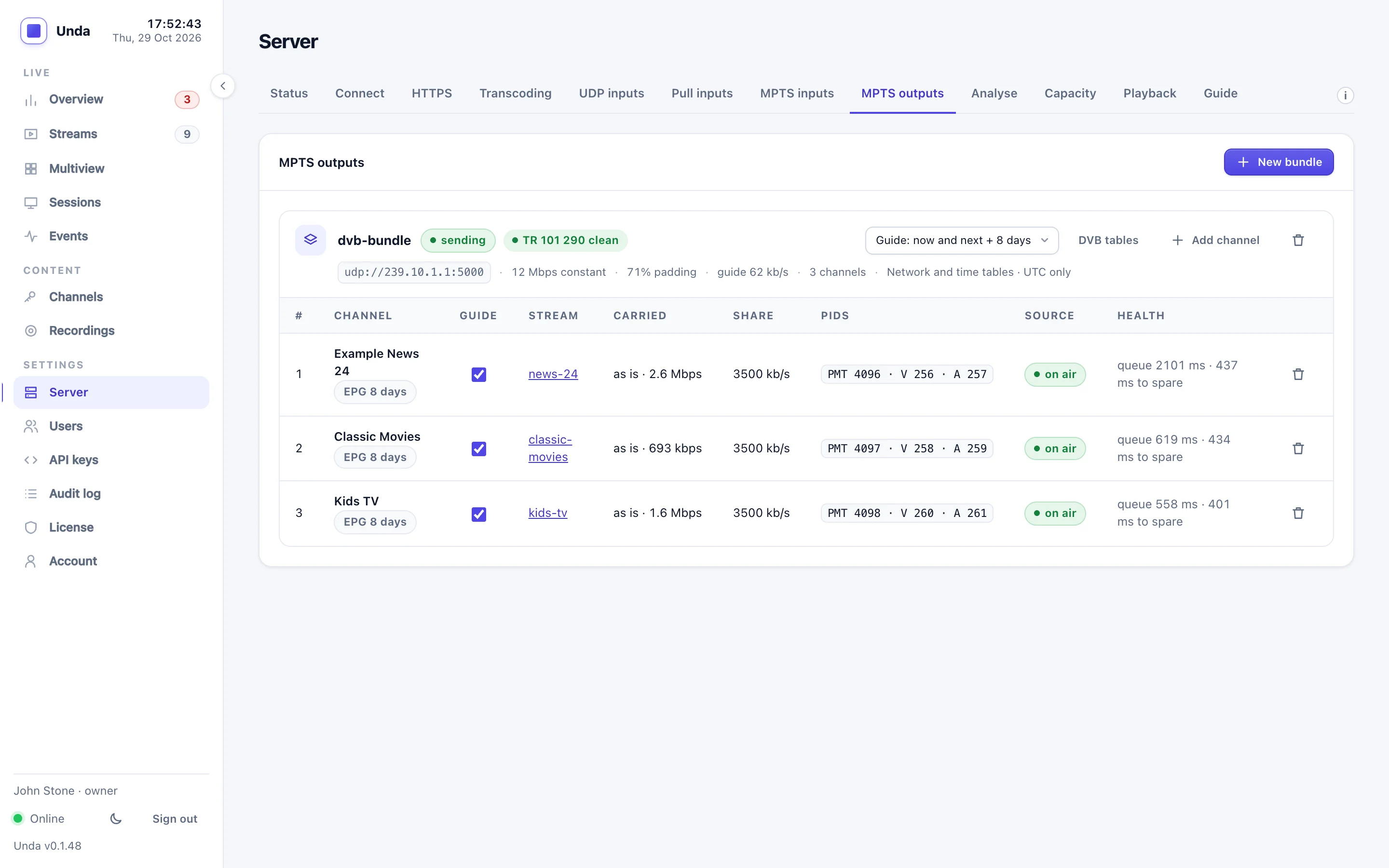
In the dashboard: Broadcast → MPTS outputs → New bundle (operators). Give it a name, where to send it and a total bitrate, then add the channels: for each, its source (a channel, a 24/7 channel whether on air or not, or any other live stream), its channel number and name, and whether it is sent as it is or converted to standard definition. Add channel adds one to a running bundle. Bundles made in the dashboard are kept when the server restarts.
Edit changes a running bundle without making it again:
- On a channel's row: its stream, name, share, how it is carried (as it is, or converted), its PIDs and ad cues. Only that channel restarts (off air a few seconds); the others carry on, and its packets continue the counters receivers follow, so the change doesn't show as transport errors. If the new settings don't fit (more than the bundle's total, a PID already used), it goes on with the old ones and says why. The channel number stays.
- On the bundle: where it is sent, the provider name, the bitrate (constant or variable, and the total) and what an offline channel shows. Leave the destination empty to keep it, passphrase included. The bundle is built again with its channels, PIDs, guide and network tables, so every channel is off air for a few seconds; if the new settings can't start, it goes on with the old ones. The guide and the network tables have their own controls and change without a restart.
Bundles from the configuration file are changed there.
Or in the configuration file:
mpts_outputs:
  - name: iptv-bundle-1
    destination: udp://239.2.2.1:6000     # or rtp://... (?fec=2d adds SMPTE 2022-1 FEC), srt://host:port?streamid=..., srt://:9000?passphrase=... (the receiver connects), rist://host:5000
    interface: eth0                       # for multicast: the network card to send on
    ttl: 4
    provider: "Unda Community TV"
    total_bitrate: 25Mbps                 # the whole bundle, padded to this rate
    offline: slate                        # what an offline channel shows: black (default), slate or none
    slate_image: /etc/unda/slate.png      # your "we'll be right back" picture
    # epg: now_next                       # the programme guide: schedule (default: now/next + 8 days), now_next or off
    programs:
      - stream: channel-1
        program: 1
        name: "Channel 1"
        bitrate: 6Mbps                    # sent as it is: this channel's share
        # epg: false                      # leave this channel out of the bundle's guide
      - stream: sports-hd
        program: 2
        name: "Sports HD"
        encode: { format: 1080i25, audio_codec: ac3 }  # converted to HD 1080i H.264 with AC-3
      - stream: community
        program: 3
        name: "Community TV"
        bitrate: 1300kbps                 # converted to SD H.264 + AAC 128: the video fills the share
        encode: { format: 576p25 }
Each channel is either sent as it is (give it a bitrate a little above what the stream uses at its busiest) or converted for TV equipment with encode: SD 576p25 / 576i25 or HD 720p25 / 720p50 / 1080i25 / 1080p25 / 1080p50, H.264, HEVC or MPEG-2 video, AAC, MP2 or AC-3 audio (with or without B-frames: no_b_frames), with the same settings as a broadcast output. A converted channel's bitrate is its whole share of the bundle, and its video is fitted into it: an SD H.264 channel with a 1300 kb/s share gets 1040 kb/s of video and AAC at 128 kb/s. On a server whose FFmpeg is version 4 (Ubuntu 22.04's) it gets 1000 kb/s, because that FFmpeg leaves less time between a picture's arrival and its decode time; FFmpeg 6.1 and later (Ubuntu 24.04 and the Docker image) leave more. Without a share, SD H.264 takes 1300 kb/s (a common rate for SD channels); set video_kbps in encode to choose the video rate yourself. The bundle table shows each channel's video and audio rates. Channel numbers, PIDs and names can be set to match the plan agreed with the receiving side; anything left out is chosen for you without clashes.
PIDs. Left empty, each channel gets the next free ones: PMT from 4096, then picture and sound from 256 (channel 1: 256 and 257, channel 2: 258 and 259, and so on), shown on each channel's row. Set them only when equipment further on is configured by PID number (a multiplexer, a scrambler, an IRD with PID filters): in the dashboard, open PIDs under the channel's row (decimal, or hex like 0x101); in the configuration file, pmt_pid: and pids: { video: 0x101, audio: [0x102] }. A channel keeps the PIDs it was given, automatic ones included, when channels are added or removed and when the server restarts.
Constant or variable bitrate
By default a bundle is constant bitrate: padded to its total with null packets, which DVB multiplexers, modulators and many IRDs require. For an IP network that does not need a constant rate, set total_bitrate: vbr (or choose Variable in the dashboard): the bundle then sends only what its channels carry, with no padding, and has no total to outgrow. The Broadcast page shows what it is sending now.
Ad cues (SCTE 35)
A channel can announce its stream's ad breaks to an ad inserter downstream: tick its box in the bundle's Cues column, or Send ad cues under its PIDs when you add it. See Ad breaks.
Programme guide (EPG)
A channel whose stream is a 24/7 playout channel carries its programme guide, taken from the channel's playlist: each item's title (or its file name when it has none) and, if you wrote one, its description. TVs and set-top boxes show two things:
- Now and next: the programme on air, its start time and length, and what comes next. A live takeover shows as "Live"; while the channel plays filler, "now" is empty.
- The 8-day guide: every programme from midnight (UTC) today for 8 days, in the TV's guide grid. A live takeover isn't in it: it can't be known in advance.
Both follow the playlist by themselves: save it and the guide changes within seconds. They are sent as DVB EIT on PID 0x12 (now and next every second, the 8 days every 10 seconds), and the SDT marks those services as having them.
A live channel (fed by an encoder) carries the guide typed in on its EPG tab (how) the same way, its "between programmes" title included. Other channels carry no guide.
Choose per bundle what it sends: now and next + 8 days (the default), now and next only, or off. In the dashboard it is the Guide menu on each bundle (Broadcast → MPTS outputs), changeable while the bundle is on air; in the configuration file, epg: schedule | now_next | off. Turn it off when equipment further down the chain inserts its own EIT, so the two don't conflict. A channel can also be left out on its own (its guide tick box, or epg: false on the program).
The 8-day guide takes bandwidth: about 7 kb/s per channel with titles only, up to about 80 kb/s with long descriptions. It is sent only in the bundle's padding, never ahead of the channels' video, so it can't disturb them; the bundle shows what it takes ("guide N kb/s"). If a constant-bitrate bundle has too little padding, a "guide short of room" notice says so: raise the total, or choose now and next only.
One channel to a modulator? Make a bundle with that one channel: it is the same output, with the guide.
Programme guides for IPTV apps (XMLTV) are described on the 24/7 channels page.
Network and time tables
Every bundle also sends the two DVB tables receivers use to list channels and set their clocks:
- NIT (network information): the network's name and the bundle's channels with their type. TVs and set-top boxes read the channel list from it when they scan.
- TDT and TOT (time): UTC every 5 seconds and, when you set a time zone and country, the local time with its next daylight-saving change, so receivers show the right clock.
They are on by default. Set them under Network and time tables when you make a bundle, or with DVB tables on a bundle that is already sending (changes apply at once):
| Setting | What it does |
|---|---|
| Network name | The name receivers show for the network; empty uses the provider's name |
| Local time | A time zone, for the local time and its daylight-saving changes; "UTC only" leaves the local time out |
| Country | The country's three-letter code (e.g. FRA); needed with a time zone |
| Send network and time tables | Untick it when equipment further down the chain inserts its own |
In the configuration file:
mpts_outputs:
  - name: iptv-bundle-1
    # ...
    network_name: "Example Network"
    time_zone: Europe/Paris
    country: FRA
    # network_tables: false     # leave the NIT and TDT/TOT to other equipment
Each channel is announced with the type its picture calls for: SD or HD H.264, HEVC or MPEG-2 for converted channels, and SD or HD H.264 for channels sent as they are (read from the stream itself). Receivers use it to label the channel and pick their decoder.
Sending over RIST
rist://host:port sends the bundle with RIST Simple Profile: the receiver asks for what the network lost and Unda sends it again, from the last second (?buffer= in milliseconds to change it; use the receiver's value). Use an even port; the next one carries the control traffic. It also works for single streams (restream destinations) and broadcast outputs. Like UDP, only operators can add RIST destinations.
Encrypted RIST (Main Profile)
Add a passphrase to send with RIST Main Profile, encrypted:
rist://receiver.example.net:5000?secret=a-long-passphrase&aes-type=256secretis the passphrase, 8 to 128 characters; the receiver needs the same one. Use a long one (16 characters or more): someone who records the stream could try passphrases against it at leisure.aes-typeis128(the default) or256, and must match the receiver's setting.profile=mainwithout a secret sends Main Profile in clear.- Main Profile uses one port each way (any port, odd too) and carries the control traffic inside it, so a firewall needs only that port open.
buffer,path2(two paths) andcname(the name the receiver sees) work as with Simple Profile.
The passphrase never appears in the dashboard, the API's answers or the logs (secret=***). It keeps the stream private on the way; like SRT's, it does not prove who sent a packet, so keep receiving inputs' Allow list to your senders. Unda supports the passphrase form of encryption; RIST's user name and password sign-in (SRP) and null-packet deletion are not supported: turn them off at the other end.
Tested with librist 0.2.20's ristsender and ristreceiver (--profile 1, AES-128 and AES-256), both ways, through 5 % loss.
Letting the receiver connect (SRT listener)
Some teleports and stations pull the channel: their receiver is an SRT caller and connects to you. Then give the bundle's destination an address without a host, and Unda waits on that port:
srt://:9000?passphrase=a-long-passphrase- Give the receiving side this server's address, the port and the passphrase. Open the UDP port in the server's firewall.
- A listener needs a passphrase (10 to 79 characters) or the receivers' addresses:
allow=203.0.113.7,198.51.100.0/24takes only those. Use both when you can. Without either, anyone who found the port could take the channel, so Unda refuses the address. streamid=…takes only receivers that ask for that stream ID;latency=(milliseconds) is as for sending.- Up to 8 receivers at once (a main and a backup receiver, for example), each sent the whole channel. A receiver that can't keep up is let go; its gear connects again.
- The encoder keeps running while nobody is connected, so a receiver gets the channel the moment it connects. The row says who is connected, or that it is waiting, and shows a refused receiver with the reason (wrong passphrase, an address not allowed).
- Pick a port nothing else on the server uses: not the server's own SRT port, an input's or another output's.
Tested with TSDuck 3.45 (libsrt 1.5.7) as the receiver: the bundle arrived at its constant rate with no continuity errors.
Channels can be added and removed while a bundle runs (in the dashboard or through the API, /api/v1/mpts); receivers pick up the change by themselves. Set the total bitrate with room to spare if you plan to add channels later: it is fixed, and a channel that does not fit is refused (a variable-bitrate bundle has no such limit).
How it behaves
- If one stream goes offline, the others carry on and its channel stays listed, showing black with silence, or your slate picture with
offline: slate. Receivers keep the channel instead of reporting "no signal". When the stream comes back it takes over by itself within a couple of seconds. Withoffline: nonethe channel is listed but carries nothing. - Channel names and the provider appear in receivers' channel lists, and playout channels show now and next.
- If the channels need more than the total bitrate, the server refuses the setup, or, if a stream grows beyond its share while running, logs an error rather than silently dropping data.
- A channel sent as it is must stay within its share. When its stream sends more (an encoder's bitrate raised, or busy pictures above the set rate), pictures start reaching TVs after they were needed, so viewers see freezes or a broken picture, a few seconds before any data is dropped. The server checks every picture's timing as it leaves and raises a critical alert at once, with what the stream sends against its share. A warning comes earlier, when pictures arrive with less than 100 ms to spare (normally about 700 ms). Raise the channel's share, or convert it with
encode. - A channel sent as it is goes on air as the client's encoder made it. The server warns when the stream isn't shaped for DVB TV: a frame rate other than 25 or 50, sound not at 48 kHz, a portrait or larger-than-HD picture, or an H.264 profile or level TV boxes don't decode (above level 4.0). Converting the channel, or changing the encoder's settings, fixes it.
- Each channel runs its own encoder process; sending as it is costs very little CPU, converting costs about a third of a core per channel.
The Broadcast page lists each bundle with its channels: which stream feeds each one (and, for channels sent as it is, what the stream sends), whether it is on air (or showing black or the slate), how far ahead of time its pictures arrive, and any late pictures or dropped packets. Every packet sent is also checked the way broadcast test equipment does: see Transport-stream checks below. A channel whose stream goes offline raises a warning (and an entry in the event log); late pictures, dropped packets and a bundle that cannot be sent raise critical alerts, and transport-stream errors, pictures with little time to spare and streams not shaped for DVB raise a warning.
Transport-stream checks (TR 101 290)
Unda checks every packet of each bundle it sends and each bundle it receives the way broadcast test equipment does (ETSI TR 101 290):
- Priority 1, needed to decode the stream at all: sync, the PAT and PMTs, continuity (lost or repeated packets) and missing streams.
- Priority 2, needed for a steady picture and sound: packets the sender marked as damaged, table CRCs, the PCR clock (interval, jumps, accuracy), timestamps (PTS) and the conditional-access table.
- Priority 3, the DVB service information TVs read: the network table (NIT), channel names (SDT), now and next (EIT), the time (TDT), how often each table repeats, and packets on PIDs no table names.
Each bundle shows TR 101 290 clean, or the errors counted in the last minute; a bundle Unda receives shows what they mean for viewers (see below). Click it for the report, refreshed every 3 seconds while it is open. It opens with a sentence on what the errors mean for viewers, then what to do; the notes for the sender's engineer and the full report are folded underneath (the full report stays open once you open it):
- Likely cause and what to do: Unda works out what most likely caused the errors from what it knows about the stream (packets lost on the way and how many, its own queue overflowing, a TV output's encoder falling behind, a busy processor, how the stream arrives) and says what to do about it. For example, continuity errors on a UDP feed point to packets lost on the network, and PCR interval errors that no loss explains to the encoder's PCR setting. The alert for the errors names the likely cause too;
- every check, with its count over the last minute and since the bundle started (the "i" beside each says what it means and what to look at);
- the latest errors, with the time, PID, channel and what exactly was wrong (for example "counter 7 after 5" or "52 ms apart");
- each PID: what it carries, its bitrate, continuity errors, PCR interval (shortest, average, longest) and longest gap between timestamps;
- each table: how many copies came and the shortest and longest interval between them;
- what the tables say: the network name and its channels, each channel's name, provider and type, and the time the stream carries compared with the server's clock.
A bundle Unda sends must carry every table from the start (the NIT and TDT only when its network and time tables are on), and every error on it raises a warning: TVs and receivers take it as it is. A bundle Unda receives is held to a table only once it has carried it, because many satellite and IPTV feeds carry no network or time table. The counts are also in /metrics (unda_mpts_tr101290_errors_total, unda_mpts_input_tr101290_errors_total and the same per channel).
Plays fine, or viewers may see glitches
Unda doesn't send a stream it receives on as it arrives. It takes the pictures and sound out and builds a new clock, new timestamps and new tables for everything it sends (HLS, RTMP, its own MPEG-TS outputs, TV outputs and bundles). So on a stream Unda receives, only some errors can reach your viewers:
| Can reach viewers | Can't reach viewers |
|---|---|
| Lost packets (continuity), damaged packets (transport error), sync loss, a missing picture or sound stream (missing PID), a stall (PTS), scrambled packets (CAT) | The sender's clock (PCR interval, jump, accuracy), its tables (PAT/PMT timing, CRC, SI repetition, NIT, SDT, EIT, TDT) and unreferenced PIDs |
A stream whose errors are all in the second column shows Plays fine and raises no alert: the report lists them as notes for the sender's engineer, since they matter to equipment that takes the same feed directly. Errors in the first column show Viewers may see glitches, raise a warning and come first in the report, with what to do. A late PAT or PMT only means a channel takes a moment longer to start after a break.
The same check runs on single-channel UDP and RTP inputs and on streams published over SRT (as inputs: only errors viewers can notice alert), and on TV outputs and UDP, RTP, RIST and SRT destinations (as outputs): see UDP / MPEG-TS, SRT and Restreaming. To check any other stream for a while, without receiving it as an input, use the stream analyser.
Checking it yourself
To check a bundle independently of the server, capture it with TSDuck where it arrives and analyse the file. A test bundle (a live channel, an offline one showing black, and a playout channel with now and next) passed these checks with no errors over 12 minutes.
tsp -I ip 5000 -P until --seconds 600 -O file cap.ts      # a multicast one: -I ip 239.2.2.1:5000
tsp -I file cap.ts -P continuity -P pcrverify --bitrate 8000000 --absolute --jitter-max 13 -O drop
tsanalyze cap.ts                                           # channels, PIDs, bitrates, discontinuities
tstables cap.ts --pid 0x12 --diversified-payload           # now and next, one entry per change
--bitrate is the bundle's total bitrate in b/s (constant bundles only). Expect no continuity: lines and "0 with jitter" from pcrverify.
Multi-channel bundles are tested with software receivers (VLC, ffmpeg) and TSDuck.