
Protecting playback with signed links
By default anyone who knows a stream's name can watch it. For paid or private events you can protect a stream: it then plays only from a signed link, an address with a ?token= that you (or your website) made, and only until the time the link allows.
Protection covers every way of watching: the built-in player, HLS, DASH, RTMP, SRT, MPEG-TS over HTTP and WebRTC. Publishing is unaffected (the encoder still uses its stream key).
Protect a stream
- Open the stream in the dashboard (it doesn't have to be live) and go to its Output tab.
- Switch on Require a signed link.
To protect every stream on the server, an administrator switches on Require a signed link for every stream under Server → Playback.
Streamers can protect their own channels and make links for them; operators and above can do it for any stream.
Make a link in the dashboard
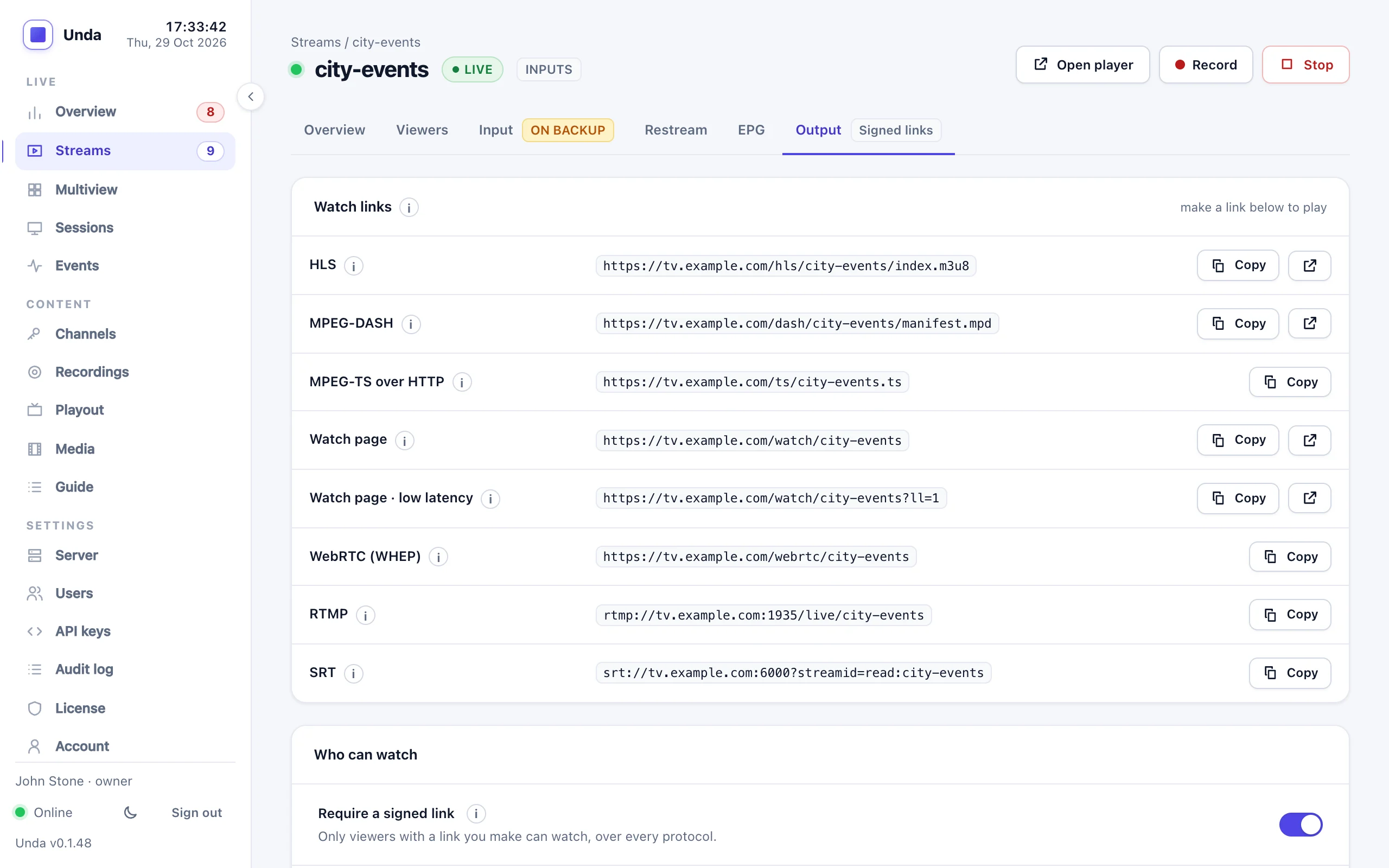
On the Output tab, under Who can watch, choose how long new viewers can start watching (1 hour to 30 days) and click Make a link. Every address in Watch links then carries the link, for example:
https://tv.example.com/watch/main-show?token=1790560829.rr8snjtkKtg3EJgQaeHvJQGive that address to your viewers, or use its HLS form in your own player.
What the time limit means
A link's time is the latest time to start watching. Someone who started before it carries on to the end of the event; a viewer who opens the link afterwards is refused ("This link is not valid or has expired"). So a link made for "until 20:00" can be sent before a show that runs to 22:00.
In detail: over HLS and DASH a viewer stays allowed while their player keeps fetching (a gap of more than 30 seconds, or a different network address, ends it). RTMP, SRT and MPEG-TS over HTTP check the link once, when the player connects.
Devices per link
Anyone who has a link can use it, so a buyer could post a paid link in a group chat. To stop that, limit how many devices can watch with one link at once:
- On the stream: the Output tab's Devices per link (1, 2, 3, 5 or unlimited) applies to every link for that stream.
- On one link: when making a link, choose its own number (a single ticket for 1 device, a family pass for 3). A website puts the number in the token (below).
When a link is opened on more devices than it allows, the newest device plays and the oldest one stops. On the player page the stopped device shows "This link is now playing on another device" with a Watch here button that takes the link back. A paying viewer can move from phone to TV at any moment; people sharing one link keep stopping each other, so sharing stops being useful.
- A stopped player never takes the link back by itself: its own requests are refused, and for a minute so is any automatic restart from its network address (VLC and other players reconnect on their own). Only Watch here, or starting again after that minute, takes it back. Once the newer device has left, the stopped one simply carries on.
- A reload of the same page in the same browser is not counted as another device.
- A device counts over HLS by its player session (each browser tab), over DASH by its address and player, and over RTMP, SRT and MPEG-TS over HTTP by its connection (a stopped player is disconnected).
- The Output tab shows how many devices were stopped in the last 24 hours, and the event log gets one line an hour per stream while it happens: a sign that links are being shared.
Make links on your own website
A website that sells tickets or has its own sign-in can make a link for each viewer without calling the server. An administrator copies the signing secret from Server → Playback and keeps it on the web server (never in a page's code).
A token is <expiry>.<signature>:
expiry: the latest start time, in Unix seconds;signature: HMAC-SHA256 with the secret (the hex string, decoded to 32 bytes) ofunda1:<stream name>:<expiry>, keeping the first 16 bytes, encoded as base64url without padding.
The stream name is part of the signature, so a link for one stream never opens another.
For a link that at most N devices (1 to 99) can watch at once, sign unda2:<stream name>:<expiry>:<N> instead, the same way, and write the token as <expiry>.<N>.<signature>. A token without N follows the stream's own setting.
const crypto = require("crypto");
const secret = Buffer.from(process.env.UNDA_PLAYBACK_SECRET, "hex");

function watchLink(name, seconds) {
  const exp = Math.floor(Date.now() / 1000) + seconds;
  const sig = crypto
    .createHmac("sha256", secret)
    .update(`unda1:${name}:${exp}`)
    .digest()
    .subarray(0, 16)
    .toString("base64url");
  return `https://tv.example.com/watch/${name}?token=${exp}.${sig}`;
}

// The same for at most `devices` devices at once.
function watchLinkForDevices(name, seconds, devices) {
  const exp = Math.floor(Date.now() / 1000) + seconds;
  const sig = crypto
    .createHmac("sha256", secret)
    .update(`unda2:${name}:${exp}:${devices}`)
    .digest()
    .subarray(0, 16)
    .toString("base64url");
  return `https://tv.example.com/watch/${name}?token=${exp}.${devices}.${sig}`;
}function watch_link(string $name, int $seconds): string {
$secret = hex2bin(getenv('UNDA_PLAYBACK_SECRET'));
$exp = time() + $seconds;
$mac = substr(hash_hmac('sha256', "unda1:$name:$exp", $secret, true), 0, 16);
$sig = rtrim(strtr(base64_encode($mac), '+/', '-_'), '=');
return "https://tv.example.com/watch/$name?token=$exp.$sig";
}import base64, hashlib, hmac, os, time
SECRET = bytes.fromhex(os.environ["UNDA_PLAYBACK_SECRET"])
def watch_link(name: str, seconds: int) -> str:
exp = int(time.time()) + seconds
mac = hmac.new(SECRET, f"unda1:{name}:{exp}".encode(), hashlib.sha256).digest()[:16]
sig = base64.urlsafe_b64encode(mac).rstrip(b"=").decode()
return f"https://tv.example.com/watch/{name}?token={exp}.{sig}"Or ask the server for one with an API key:
curl -X POST -H "Authorization: Bearer $KEY" -d '{"ttl_seconds":7200}' \
     https://tv.example.com/api/v1/streams/main-show/playback-link
The token in each address
| Where | Address |
|---|---|
| Built-in player | https://tv.example.com/watch/main-show?token=TOKEN |
| HLS | https://tv.example.com/hls/main-show/index.m3u8?token=TOKEN (or master.m3u8) |
| DASH | https://tv.example.com/dash/main-show/manifest.mpd?token=TOKEN |
| RTMP | rtmp://tv.example.com:1935/live/main-show?token=TOKEN |
| SRT | srt://tv.example.com:6000?streamid=read:main-show?token=TOKEN |
| MPEG-TS over HTTP | https://tv.example.com/ts/main-show.ts?token=TOKEN |
Players carry the token on to every playlist and segment by themselves. For SRT in VLC, put read:main-show?token=TOKEN in the stream ID field.
WebRTC playback (WHEP)
A protected stream's WebRTC players carry the link's token as a bearer token instead of in the address: they POST their SDP offer to https://tv.example.com/webrtc/main-show with the header Authorization: Bearer TOKEN. The watch page does this by itself when its Low latency switch is on. A missing, wrong or expired token gets 403 before anything else happens, the link's device limit applies as it does for HLS (409 when the link is in use elsewhere), and a token sent over plain HTTP is refused (403). An unprotected stream needs no header.
Changing the secret
Make a new secret… under Server → Playback invalidates every link made so far, including those your website makes, until the website has the new secret. HLS and DASH viewers watching with an old link are stopped; RTMP, SRT and MPEG-TS over HTTP viewers carry on until they reconnect. Use it if the secret has leaked.
With a CDN
A CDN keeps copies of the playlists and video pieces and hands them to every viewer who asks, without asking this server again. So behind a caching CDN, a signed link is only checked when the CDN fetches from this server: anyone who knows a protected stream's address gets the copies the CDN already holds, with or without a link. Devices per link don't work through a CDN either: this server sees the CDN's computers, not the viewers.
To keep a stream protected with a CDN in front, do one of these:
- Let the CDN check the links. Use the CDN's own signed URLs or token authentication (most CDNs have one) and have your website make those links instead. Switch Require a signed link off for the stream here, since the CDN's requests carry no link of this server's, and make sure viewers can't go round the CDN: let only the CDN reach this server's
/hls/addresses, for example with a firewall rule for the CDN's published address ranges. - Don't cache the protected stream. Keep the query string in the CDN's cache key for it, or bypass the cache for its path. Every request then reaches this server and its link is checked, but the CDN saves you nothing on that stream.
Streams that aren't protected can be cached freely: see Viewer counts for the one setting a CDN needs.