
Media Server › Features › Restreaming
One stream in, every platform out
Send your live stream to YouTube, Facebook, Twitch and other servers at the same time, while it also plays on your own website. Your encoder sends one stream; Unda does the rest from your server's connection.
Reach people where they already watch
Your encoder's upload is often the weakest link at a venue. Send one stream to Unda and let your server, with its fast connection, deliver it to each platform.
- Up to 16 destinations per stream, each with its own connection
- RTMP and RTMPS (YouTube, Facebook, Twitch), SRT, UDP, RTP and RIST
- Starts as soon as the stream goes live, and waits when it stops
- One failing destination never affects the others or your viewers
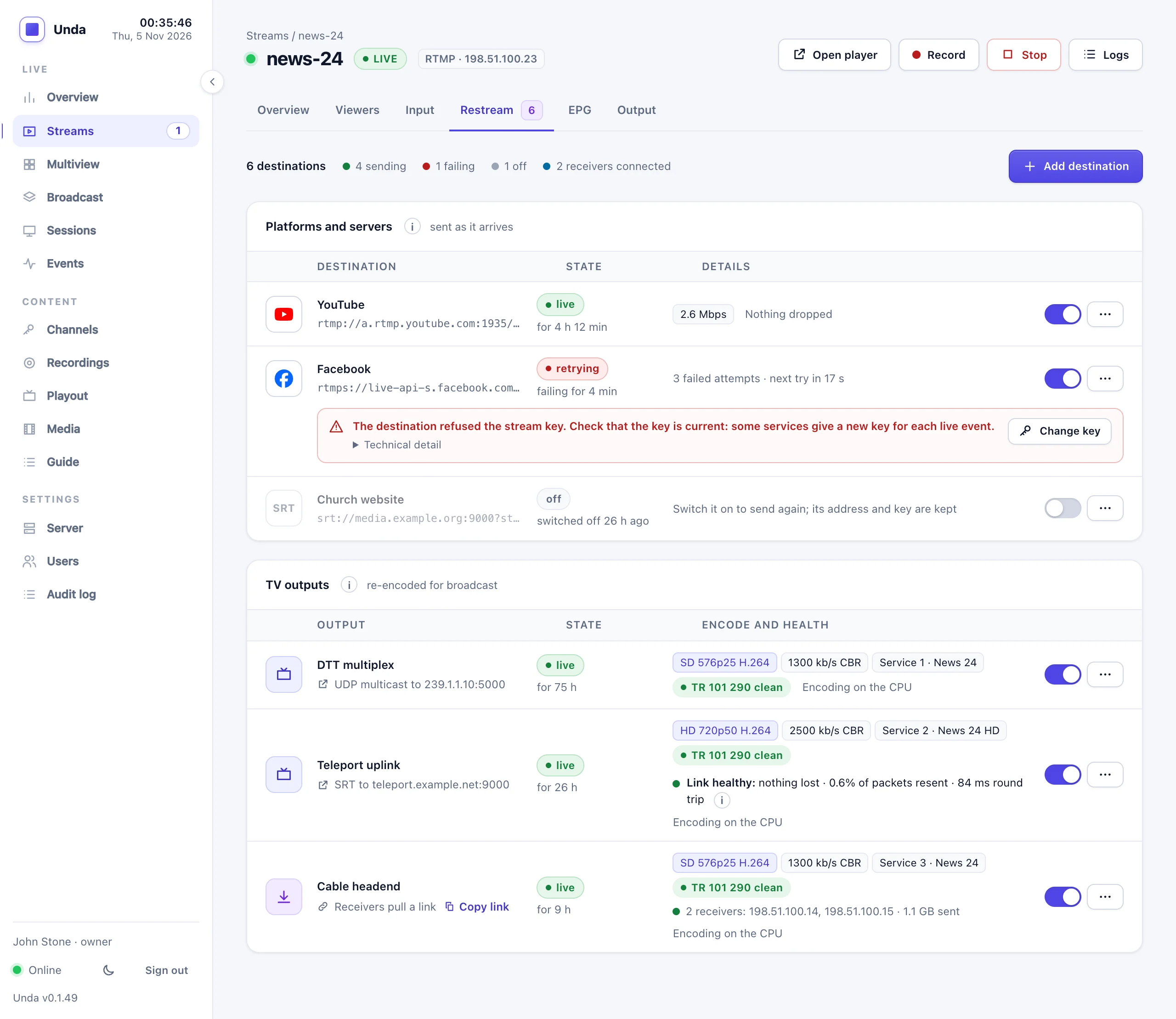
Set it up once, use it every week
Pause, don't delete
Switch a destination off after the event and on again next week. Its address and key stay saved, also after a restart or an upgrade.
Honest status
A destination shows live only once the platform has accepted the stream. A wrong or expired key shows as a failure, in plain words, not as "connected".
Retries that stop
A failed destination is retried after 5 s, 10 s, 30 s and longer. After 30 minutes of failing (an ended YouTube event, a revoked key) it switches itself off and tells you why.
Keys stay secret
After you add a destination, the dashboard, the API and the logs show its key only as ****. Presenters can restream their own channels without seeing anyone else's.
Alerts that make sense
One alert per stream when destinations fail for more than two minutes, however often they retry, and one line in the event log per failure run.
Your upload, counted
Each destination uses as much of your server's upload as one viewer. The dashboard shows restreaming separately, so you know what is left for viewers.
Where you can send a stream
Tested in production with YouTube and Facebook. See what works with Unda for the full list.
| Destination | How |
|---|---|
| YouTube | RTMP, with the stream key YouTube gives you |
| Facebook Live | RTMPS, with the key from Live Producer |
| Twitch and other RTMP platforms | RTMP or RTMPS |
| Another Unda or streaming server | RTMP, SRT (with encryption), RIST |
| Your local network, vMix, receivers | MPEG-TS over UDP or RTP, unicast or multicast, with optional error correction on RTP |
Related features
Backup encoder
If the venue's encoder drops, a backup takes over and every platform stays connected.
Learn more →Recording
Keep a copy of every stream on your server while it goes out everywhere.
Learn more →Monitoring and alerts
See every destination's state and know about a problem before your audience does.
Learn more →Stream everywhere from one place
Tell us which platforms you stream to and how often, and we'll suggest a package.