
Channel inputs (live, pull, playlist)
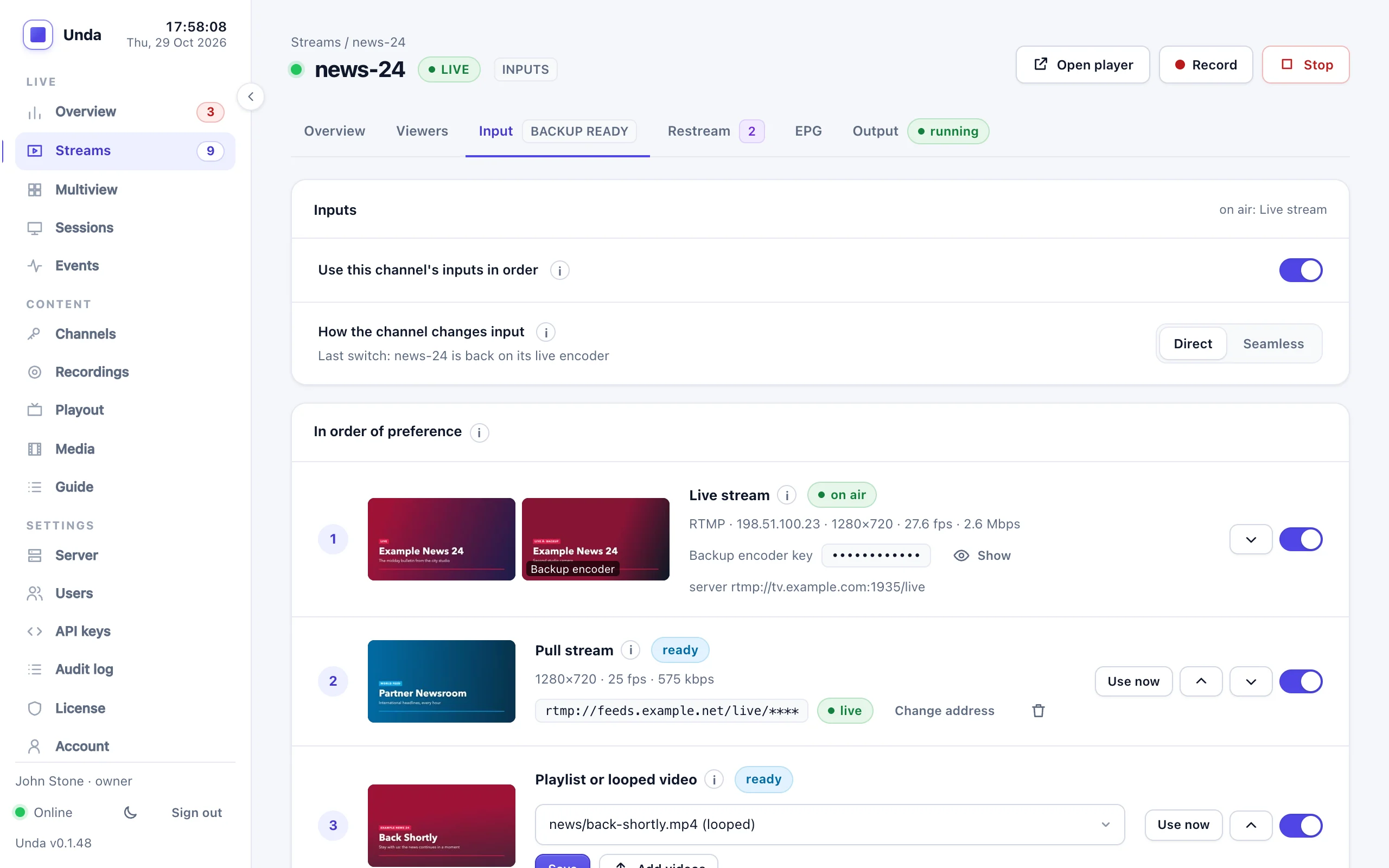
A channel can have up to three inputs, ranked first, second and third:
| Input | What it is |
|---|---|
| Live stream | Your encoder (OBS, vMix, a hardware encoder) with the channel's stream key, plus a backup encoder with its backup key |
| Pull stream | A link Unda fetches the stream from: a TV station's HLS address (.m3u8) or MPEG-TS over HTTP; operators can also set an RTMP server or an RTSP camera |
| Playlist or looped video | Videos from the Media page, played round and round |
The first input in your order that has pictures is on air. When it stops, the next one takes over. When a better one is back and steady, it takes over again. Viewers keep watching the channel under its own name, and restream destinations keep pushing it.
For example, a station whose programmes are pulled from its own HLS link can put Pull stream first, Live stream second for a studio encoder, and a Playlist of station idents third for when both are down.
Channel inputs are in the Professional and Broadcast packages (see Licence below).
Switch them on
- On the Channels page, click Inputs next to the channel. It doesn't have to be live: a new channel can go on air from its pull stream or playlist without an encoder ever connecting.
- Switch on Use this channel's inputs in order.
If the stream is live at that moment, its encoder is disconnected once and reconnects by itself (OBS and vMix do this automatically).
The channel's owner can do this, not only operators.
Choose the order
Under In order of preference, each input has:
- its place (1, 2, 3) and a state: on air, ready (it has pictures and waits), or no signal;
- a small picture of what it is sending, refreshed every few seconds (a grey box while it sends nothing). A looped video or playlist starts only when it is needed, so its picture may say so; with seamless switching it plays inside the channel, so its picture shows while it is on air;
- ↑ and ↓ to move it up or down;
- a switch to use it or not. An input that is switched off is never put on air.
You can change the order while the channel is live: the stream doesn't restart. An input moved above the one on air takes over once it has been steady for the time you set (10 seconds by default); the one on air hands over at once if you switch it off.
The Channels page shows each channel's order, for example Inputs: Pull → Live → Playlist.
Live stream
The channel's stream key is the main encoder. Switching inputs on also gives the channel a backup key for a second encoder, which takes over when the main stops; see Backup encoder. Both are part of the live stream input, the main first.
Pull stream
Type the link and choose Save address. Unda fetches it, reconnects by itself when it drops, and shows its state next to the address.
- The address is kept on the server and never shown again in full (it may carry a token or a password). To change it, type the new one.
- The channel's owner may enter HLS (
.m3u8) or MPEG-TS links overhttp://orhttps://on the public internet. Addresses on the server itself or on a private network are refused, including links that redirect there. RTMP servers, RTSP cameras and addresses on your own network are set by an operator. - A playlist that has ended (
#EXT-X-ENDLIST, as a station's server shows for a while after it goes off the air) is not played as a recording: the input reads The playlist has ended and waits for the station to be back. - Taking the pull out of the order stops fetching it, so it costs no bandwidth while unused.
See Pull inputs for what Unda does with a pulled stream (audio conversion, reconnecting, codecs).
Playlist or looped video
Choose Playlist or one video, then Save. With Playlist, its editor opens below: add videos in the order they should play and Save schedule. It works like a 24/7 channel's playlist and loops by default.
The playlist runs on its own clock, as if a 24/7 channel were playing it in the background. When it goes on air, viewers join it wherever it is at that moment, not at its first video. You can edit it at any time, even while it is on air.
The videos are the channel's own files and the shared ones on the Media page. To add your own, click Add videos next to What plays: the files go into the channel's own folder and can be looped or put in the playlist as soon as they have been checked.
A logo on the playlist
The Logo card on the Input tab puts your logo on the playlist or looped video, so viewers still see it while the live feed is down. It works like a 24/7 channel's logo: choose a PNG or JPEG, the corner, the size and the opacity, and Save logo. It is on air from the playlist's next picture. The card appears once the playlist is one of the channel's inputs.
The logo goes on the playlist or looped video only. The live encoder and pull streams are passed on as they come, with no logo added, in both direct and seamless switching. The logo is removed with the channel.
What viewers see
| Moment | Viewers see |
|---|---|
| The input on air disconnects | The next input with pictures, within about a second |
| The input on air freezes (connected, no pictures) | The last picture for 2 seconds (your setting), then the next input |
| A better input is back | That input again, once it has sent steady pictures for 10 seconds (your setting) |
| The channel starts (the server restarted, or the first encoder connects) | The first input with pictures, at once |
| No input has pictures | The stream ends after 10 seconds (your setting): an outage, with the usual alerts |
The Input tab shows which input is on air and the last switch with its reason; the event log records every switch. While the channel runs on anything but its first input, an alert says so.
Use now (operators) puts a ready input on air ahead of the others while it has pictures.
Direct or seamless switching
Direct switching (the default)
Unda relays the input on air as it is, with no re-encoding and no extra CPU. It switches at the new input's keyframe and keeps the stream's clock running, so:
- Inputs encoded alike switch without viewers noticing. "Alike" means the same video settings (codec, profile, resolution, frame rate) and the same audio settings (sample rate, channels). Set your encoders to match, for example the studio encoder to what the station's HLS link carries.
- Inputs encoded differently restart the stream for a moment, because players can't follow new picture settings in the middle of a stream. Unda's own watch page starts again by itself, about ten seconds later; other players may need to be restarted, depending on the player. Restream destinations reconnect by themselves. A recording in progress stops; start it again. The event log says restarted on its … (its picture settings differ).
- The playlist is encoded by Unda, so it rarely matches an outside encoder: switching to it or back usually restarts the stream.
Seamless switching (operators)
An operator can switch on Seamless switching. Unda then decodes every input and encodes the channel itself, so no switch is ever seen and players never restart, whatever each input sends. Viewers get the picture settings the operator chooses (720p, 30 fps, 3000 kb/s by default).
This costs:
- about 60% of one CPU core for a 720p channel, more for 1080p;
- about 13% more for each input kept ready;
- about 13% more while a looped video or the playlist is on air.
A 4-core server can handle 2 or 3 seamless channels. The picture is re-encoded once, and latency grows by about a second. Seamless switching is limited to 16 channels, and changing its settings restarts the stream.
Settings
| Setting | Default | |
|---|---|---|
| Switch after no picture for | 2 s | A shorter freeze shows as a freeze, not a switch |
| Back to a better input after | 10 s | How long a better input must be steady before it takes over again |
| When no input has pictures | end the stream after 10 seconds | Or after 1 or 5 minutes. With seamless switching: after 1, 5 or 30 minutes, or black around the clock |
Who can change what
| Channel owner | Operator and above | |
|---|---|---|
| Switch inputs on or off, choose the order | ✓ | ✓ |
| The timings above | ✓ | ✓ |
| Pull address | public HLS and HTTP links | any address, RTMP, RTSP |
| The playlist or looped video, and its logo | ✓ | ✓ |
| Use now, extra inputs (a UDP input, a program of a multi-channel input, another channel) | ✓ | |
| Seamless switching and its picture settings | ✓ |
Licence
| Option | Included in |
|---|---|
| Live stream (with its backup encoder) | Professional, Broadcast |
| Pull stream | Professional, Broadcast (licence feature pull) |
| Playlist or looped video, seamless switching | Professional, Broadcast (24/7 channels, licence feature playout) |
On a Starter server the Input tab shows the live stream only, with Pull stream and Playlist or looped video greyed and the note Not included in your licence.
A channel with inputs counts as one live stream in your package: its encoders, pull and playlist don't count separately.
Limits
- Inputs protect against an encoder, a link or a station failing, not against this server failing.
- One pull address per channel.
- The switch log on the Input tab is kept for seamless switching only; with direct switching, the event log records each switch.
- Channel inputs are for channels created on the Channels page. 24/7 channels from a schedule have their own live input (see 24/7 channels).
- Watching an input directly (
/watch/main-show.pull) needs a signed link. Viewers watch the channel itself.
What has been tested
On the real server with FFmpeg encoders, an HLS pull from another Unda server, and HLS and RTMP viewers decoding every frame:
- Direct switching between an RTMP encoder and an HLS pull encoded alike, both ways: no restart, and the viewers decoded with no errors.
- Changing the order while live (the pull first, then the encoder first again): no restart; Unda's watch page (hls.js in Chrome) played straight through.
- Direct switching to the playlist: the stream restarted, and the watch page started again by itself about ten seconds later, without a reload.
- Seamless switching from the encoder to the pull, to the playlist and back: the viewers stayed connected throughout with no errors.
- Sound against picture, measured with a test picture that flashes as a beep starts: 0 ms on direct switching; on seamless switching 3-13 ms from the encoder, the pull and a 24 fps playlist (one reading of 46 ms, one frame).
- A client account entering a public HTTPS HLS link (it played), and an address on a private network (refused).
- A Starter licence: the greyed options.
- The playlist logo, measured in the pictures viewers get: on the looped video, not on the live encoder while it was on air, back on the video when the encoder stopped (direct switching); and in seamless switching, none on the live encoder's pictures and the logo once the backup took over.
For direct switching, set every encoder feeding the channel the same way (see "encoded alike" above), OBS and vMix included.